TOP

使用Source Tree 發生登入失敗fatal: Cannot determine the organization name for this 'dev.azure.com' remote URL. Ensure the `credential.useHttpPath` configuration value is set, or set the organization name as the user in the remote URL '{org}@dev.azure.com'.

使用Source Tree 遇到以下回應造成無法登入的狀況: fatal: Cannot determine the organization name for this 'dev.azure.com' remote URL. Ensure the `credential.useHttpPath` configuration value is set, or set the organization name as the user in the remote URL '{org}@dev.azure.com'.

在visual studio 2022使用以下設定source tree也同步可以正常登入devops 取得repo權限

未設定前


設定後


異常原因是未能成功透過sourcetree 登入dev.azure.com


TOP

[Java] Eclipse 安裝反組譯套件

Eclipse 安裝反組譯套件

 1.選擇工具列選單「Eclipse Marketplace」

2.選擇「Enhanced Class Decompiler 3.0.0」>「Install」


3.選擇安裝項目

4.確認 Licenses


5.安裝反組譯套件


6.點擊class時,就可以看到程式碼


TOP

[Java] Web Fragement Project

Web Fragement Project 建置完成後會是Jar檔,此方式類示ASP.Net的類別庫。

1.建立Web Fragement Project,先選擇「右鍵」> 「Other」

2.選擇「Web」>「Web Fragment Project」>「Next」


3. 設定「Dynamic Web Project Name」,選擇要關聯的Project Name 。


4.設定Web Fragement Project的Project Name


5.檢視「WCD05」是否有關連「webFragement3」的Web Fragement Project。


TOP

[Java] 解決專案JDK 與本機環境JDK不相同無法編譯問題

問題:解決專案JDK 與本機電腦JDK不相同無法編譯問題

原因:原始專案的取得為1.7版本的JDK,本機環境安裝為1.8版本JDK,造成編譯發生錯誤

1.選擇專案-->右鍵-->ProPerties
2.變更JRE System Libray
點選Java Build Path--> JRE System Library--> Edit
選擇本機環境JRE 1.8版本,(1)Workspace default JRE (2)指定本機環境JRE使用 Alternate JRE


3.選擇Project Facets > Java ,變更 Java版本至1.8版本

4. 選擇Java Compiler--> Compiler compliance level:變更版本至1.8 JRE
 5.選擇Tomcat Runtime Environment

6. 變更JRE至本機環境JRE1.8版本


TOP

[ASP.NET MVC] Controllers及Areas Controllers內有相同名稱,發生找到多個與名為 '' 的控制器相符的類型錯誤

Controllers及Areas Controllers內有相同名稱,發生找到多個與名為 '' 的控制器相符的類型錯誤


解決方式:
1. 在App_Start的RouteConfig.cs增加routes.MapRoute的namespaces


 2.Areas\Admin的AdminAreaRegistration.cs增加routes.MapRoute的namespaces


TOP

[ASP.NET][SQL Server] LocalDB開啟MDB檔發生interfaces error:50 Local Database Runtime error occurred.

環境:安裝VS2015 Update2及LocalDB 後,在VS2015要開啟MDB檔時發生錯誤訊息。

問題1: LocalDB開啟MDB檔發生interfaces error:50 Local Database Runtime error occurred.

發生的訊息內容為:A network-related or instance-specific error occurred while establishing a connection to SQL Server. The server was not found or was not accessible. Verify that the instance name is correct and that SQL Server is configured to allow remote connections. (provider: SQL Network Interfaces, error: 50 - Local Database Runtime error occurred. Cannot create an automatic instance. See the Windows Application event log for error details.

(1).因電腦原本已安裝過VS2012及SQL 2012 SQL Express LocalDB,研判可能是已經有裝過LocalDB造成未自動建立(localdb)\MSSQLLocalDB的connection。

(2).在未移除SQL 2012 SQL Express LocalDB的狀況下,又直接下指令建立MSSQLLocalDB的connection,造成連結的LocalDB停留在12的版本(SQL 2012 SQL Express LocalDB)。

問題2:
雖然成功建立起MSSQLLocalDB的connection,但MDB檔案為最新的DB所建立,因此發生版本不支援的錯誤。

The database cannot be opened because it is version 851. This server supports version 782 and earlier. A downgrade path is not supported

處理方式:刪除原本建立的MSSQLLocalDB的connection,並且重新將版本更新至851(13.0)

將MSSQLLocalDB的connection變更為version to 851 (13.0)的步驟如下:
(1).Open CMD , cd to flooder of SqlLocalDB (Default : "C:\Program Files\Microsoft SQL Server\130\LocalDB\Binn")
(2).Command "SqlLocalDB.exe delete "MSSQLLocalDB"" , The instance of LocalDB will be deleted.
(3).Command "SqlLocalDB.exe create "MSSQLLocalDB"" , Then you'll see the instance of newest LocalDB version in your computer has been created.

參考網址:http://stackoverflow.com/questions/36699309/sql-local-database-cannot-be-opened


問題3:開啟連結後無法開啟MDB檔案內的Table,發生的錯誤訊息如下。
Could not load file or assembly Microsoft.SqlServer.management.sdk.sfc version 11.0.0.0

處理方式為重新安裝SharedManagementObjects.msi檔案,並且重新開啟VS2015即可。

檔案下載位置:
http://www.microsoft.com/en-us/download/details.aspx?id=42295
  • ENU\x64\SharedManagementObjects.msi for X64 OS or
  • ENU\x86\SharedManagementObjects.msi for X86 OS, 

參考網址:http://stackoverflow.com/questions/16906686/could-not-load-file-or-assembly-microsoft-sqlserver-management-sdk-sfc-version-1

TOP

[ASP.NET] Visual Studio 停止工作

同事遇到Visual Studio 2008 卡住之後發生停止工作的問題。
重新開機之後,Visual Studio 2008就再也無法開啟,只要開啟就會發生停止工作的訊息。

查詢到相關的狀況在Visual Studio 2012的解決方式,使用相同的方式同理解決了Visual Studio 2008停止工作的問題,將此記錄下來。

  1. Removed the key: [HKEY_CURRENT_USER\Software\Microsoft\Windows NT\CurrentVersion\AppCompatFlags\Layers]. VS2012 loading but then crashing before I could do anything else (error in C:\Windows\syswow64\KERNELBASE.dll)
  2. Then I removed:
    • [HKEY_CURRENT_USER\Software\Microsoft\VisualStudio\11.0]
    • [HKEY_CURRENT_USER\Software\Microsoft\VisualStudio\11.0_Config] and started again and is working fine.

資料來源:http://stackoverflow.com/questions/12246224/visual-studio-2012-wont-start
https://social.msdn.microsoft.com/Forums/vstudio/en-US/d848776a-b00f-4311-ab09-3a8777462968/vs-2012-will-not-start?forum=vssetup
TOP

[jQuery] blockUI動態GIF檔未正確顯示

加入blockUI防止使用者重覆點擊,但在顯示遮罩時發生Gif圖檔的Loading不會動,查詢過後發現是blockUI的支援問題,需先預載圖片,也可利用Div將Loading圖檔隱藏,需要時再利用blockUI顯示。

<script language="javascript">
        $.blockUI({
            message: $('#divLoading'),
            css: {
                top:  ($(window).height() - 400) /2 + 'px',
                left: ($(window).width() - 400) /2 + 'px',
                border:     'none',
                backgroundColor:'transparent'              
            }
        });
</script>

<div id="divLoading" style="display: none; padding: 15px">
     <div style="font-size: 28px; vertical-align: middle; display: inline-block">
             <asp:Image ID="imgLoadin" ImageUrl="~/images/loading.gif" runat="server" />
    </div>
</div>  


參考資料:
http://www.4byte.cn/question/653091/chrome-firefox-doesn-t-display-images-in-objects-shown-in-beforeunload-event.html

http://htmlasks.com/ie8_display_images_chrome_firefox_doesn39_t_display_images_with_blockui

http://stackoverflow.com/questions/20054776/ie8-display-images-chrome-firefox-doesnt-display-images-with-blockui

https://github.com/malsup/blockui/issues/119

TOP

[jQuery] 利用jQuery blockUI防止使用者重覆點擊


<script language="javascript">
$(function() {
 $("input[id*=btn]").click(function(){
     $.blockUI(); 
 });
});
</script>

<asp:Button ID="btn" runat="server" CssClass="BtnBlue" />


jQuery blockUI 可修改參數表:
$.blockUI.defaults = { 
    // 顯示的文字內容 
    message:  '<h1>Please wait...</h1>', 
 
    title: null,        // 標題的文字有時用套板時
    draggable: true,    // 拖曳.須加在 jQuery UI
 
    theme: false, // 設定 jQuery UI 的套版
 
    // 樣式設計
    css: { 
        padding:        0, 
        margin:         0, 
        width:          '30%', 
        top:            '40%', 
        left:           '35%', 
        textAlign:      'center', 
        color:          '#000', 
        border:         '3px solid #aaa', 
        backgroundColor:'#fff', 
        cursor:         'wait' 
    }, 
 
    // 主題風格
    themedCSS: { 
        width:  '30%', 
        top:    '40%', 
        left:   '35%' 
    }, 
 
    // 背景圖層
    overlayCSS:  { 
        backgroundColor: '#000', 
        opacity:         0.6, 
        cursor:          'wait' 
    }, 
 
    // 鼠標圖示設定 
    cursorReset: 'default', 
 
    // 樣式運用 $.growlUI 
    growlCSS: { 
        width:    '350px', 
        top:      '10px', 
        left:     '', 
        right:    '10px', 
        border:   'none', 
        padding:  '5px', 
        opacity:   0.6, 
        cursor:    null, 
        color:    '#fff', 
        backgroundColor: '#000', 
        '-webkit-border-radius': '10px', 
        '-moz-border-radius':    '10px' 
    }, 
     
    // IE 讀取的問題
    iframeSrc: /^https/i.test(window.location.href || '') ? 'javascript:false' : 'about:blank', 
 
    // 修復IE問題 
    forceIframe: false, 
 
    // z-index 設定 
    baseZ: 1000, 
 
    // 如果都設定為 true 則自動置中
    centerX: true, 
    centerY: true, 
 
    // 修復IE問題
    allowBodyStretch: true, 
 
    // 是否禁止滑鼠事件
    bindEvents: true, 
 
    // 鍵盤事件 
    constrainTabKey: true, 
 
    // 淡入的時間.單位為毫秒
    fadeIn:  200, 
 
    // 淡出的時間.單位為毫秒 
    fadeOut:  400, 
 
    // 自動解鎖.單位為毫秒 0為手動解鎖 
    timeout: 0, 
 
    // 是否顯示覆蓋圖層
    showOverlay: true, 
 
    // 是否設定滑鼠焦點
    focusInput: true, 
 

    // 淡入完成後執行 
    onBlock: null, 
 
    // 淡出執行
    //   onUnblock(element, options) 
    onUnblock: null, 
 
    // IE BUG 需要知道詳細請看 http://groups.google.com/group/jquery-en/browse_thread/thread/36640a8730503595/2f6a79a77a78e493#2f6a79a77a78e493 
    quirksmodeOffsetHack: 4, 
 
    // 消息區塊 類別名稱 
    blockMsgClass: 'blockMsg', 
 
    // 是否重複允許封鎖
    ignoreIfBlocked: false 
};

參考資料:

TOP

[ASP.NET MVC] Entity Framework Code First Migrations add new customization table with Identity

新增客制Table包含Identity(會員登入)的 Code First Migrations
一.新增兩個Models,BolgModels及PostModels。

1.右鍵點選Models→Add→New Item

2.選擇Code→Class,輸入BlogModels.cs並且點選Add 。

3.新增BlogModels.cs及PostModels.cs。
(1)BlogModels新增BlogId及Name。

(2)PostModels新增PostId、Title、Content及BlogId。
 (3)兩個導覽屬性 (Blog.Posts 和 Post.Blog) 虛擬化。這會啟用 Entity Framework 的「消極式載入」功能。「消極式載入」表示當您嘗試存取屬性的內容時,這些內容會自動從資料庫載入。

4.Identity ApplicationDbContext新增DbSet BlogModels及PostModels
增加:
        public virtual DbSet<BlogModels> BlogModels { get; set; }
        public virtual DbSet<PostModels> PostModels { get; set; }

5.開啟Package Manager Console

6.新增移轉名稱(因為之前已新增info移轉名稱 for Identity Migrations)
PM> Add-Migration BlogModelsAndPostModles
7.更新至資料庫
PM> Update-Database
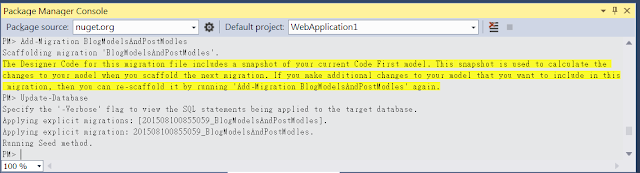
 
8.Migrations資料夾將會自動新增201508100855059_BlogModelsAndPostModles.cs

9.DB自動新增BlogModels及PostModels兩個Table。

參考資料:
https://msdn.microsoft.com/zh-tw/data/jj554735.aspx
http://www.cnblogs.com/nianming/p/3439260.html
http://www.cnblogs.com/libingql/p/3330880.html
http://www.cnblogs.com/kenshincui/p/3286103.html
http://kirkchen.logdown.com/posts/145581-using-aspnet-mvc-to-create-web-api-5-use-entityframework-code-first-database
http://blog.sanc.idv.tw/2013/05/entity-framework-code-first-ver-50.html
http://blog.sanc.idv.tw/2012/04/entity-framework-code-firstenabling.html
http://kevintsengtw.blogspot.tw/2013/10/aspnet-mvc-entity-framework-code-first.html

TOP

[ASP.NET MVC] Entity Framework Code First Migrations use Identity(會員登入)

利用Identity完成Code First  Migrations 。

1.建立ASP.Net Web Application

2.讓專案包含Web Forms,MVC,Web API。

3.成功建立ASP.Net Web Application

4.Identity的DbContext
Identity預設會將DbContext直接寫在IdentityModels.cs,ApplicationDbContext這個class內。
DefaultConnection為Web.config內設定的DBConnection。


5.開啟Package Manager Console

6.Package Manager Console開啟的畫面

7.Visual Studio 2013已內建EntityFramework,如果未內建EntityFramework則需先安裝EntityFramework。

安裝EntityFramework
PM> Install-Package EntityFramework

8.啟動Migration
PM> Enable-Migrations -EnableAutomaticMigrations

9.新增 Migration腳本,info為腳本名稱,初次建立建議使用info為初使名稱。
PM> Add-Migration info


10.更新資料庫
PM> Update-Database
11.新增完成後Solution Explorer 會自動新增Migrations資料夾,並且增加Configuration.cs及201508100619466_info.cs。

12.Server Explorer可看到資料庫內自動新增了Identity使用的五個Table及Migrations 記錄資訊的Table。
(1)_MigrationHistory
(2)AspNetRoles
(3)AspNetUserClaims
(4)AspNetUserLogins
(5)AspNetUserRoles
(6)AspNetUsers


13.檢查Migrations資料夾內的Configuration.cs將AutomaticMigrationsEnabled 是否為True。
AutomaticMigrationsEnabled = true;

14.查看201508100619466_info.cs裡面會包含Up()及Down()的方法,up為Migrations升版,down為Migrations降版。

Up()內新增初次建立Identity的Table
down()將Identity新建立的table刪除。


參考資料:
http://www.cnblogs.com/libingql/p/3330880.html
http://www.cnblogs.com/nianming/p/3439260.html
https://msdn.microsoft.com/zh-tw/data/jj193542
http://kevintsengtw.blogspot.tw/2013/10/aspnet-mvc-entity-framework-code-first.html
http://blog.sanc.idv.tw/2012/04/entity-framework-code-firstenabling.html
http://blog.sanc.idv.tw/2013/05/entity-framework-code-first-ver-50.html
http://kirkchen.logdown.com/posts/145581-using-aspnet-mvc-to-create-web-api-5-use-entityframework-code-first-database
http://www.cnblogs.com/kenshincui/p/3286103.html